March 9, 2026
How I almost became a Joker shipping my first iOS app
What it cost me to build and launch an iOS app from scratch with zero experience in 4 months.

For a few years now I've wanted to create an app to track my ADHD meds. Existing apps just didn't do it for me, they were too medical and not visual enough. They all lack Live Activities and calendar integration, and just boring.
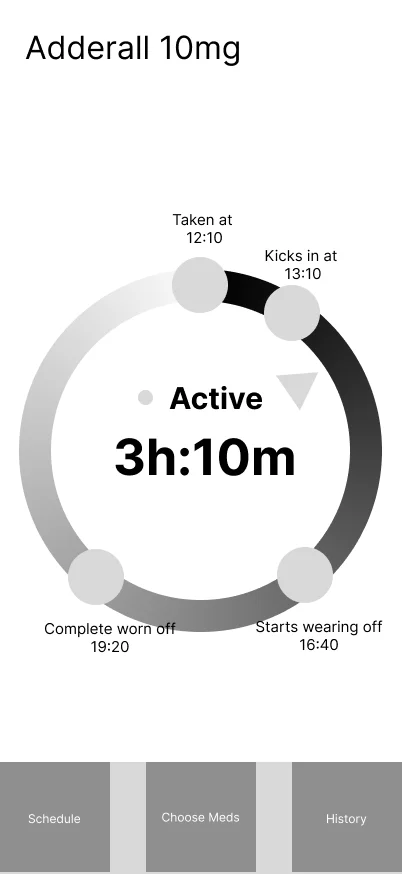
My idea was to create an app that maps your meds phases onto the clock face, so you can just glance over it and know exactly what's going on. Another feature that was a must was Live Activities, you know how it is, you open your phone to check the app you want, but get distracted and 15 minutes later you are lost reading something.
The only problem was I don't have any iOS dev experience. No experience developing something more complex than a website or a simple web-based app. The last time I built an actual app was when me and my brother were building simple games on Windows 98, I was 15 back then.
I've figured how hard can it be, there is Claude Code now. Man was I about to get a lesson from reality.
Spoiler: it cost me over $2,300, a depressive episode, and five months of my life.

October
Week 1: Choosing tech stack

Because I didn't have a Mac back then I decided to go with React Native + Expo for builds. Big mistake. Huge! It's gonna bite me in the ass down the road, but for now I'm super happy. Setting up the environment doesn't take much time, I watch a few React Native YT tutorials and get down to business.
Create a mock app, it runs on my phone, I can see updates live, what a time to be alive!
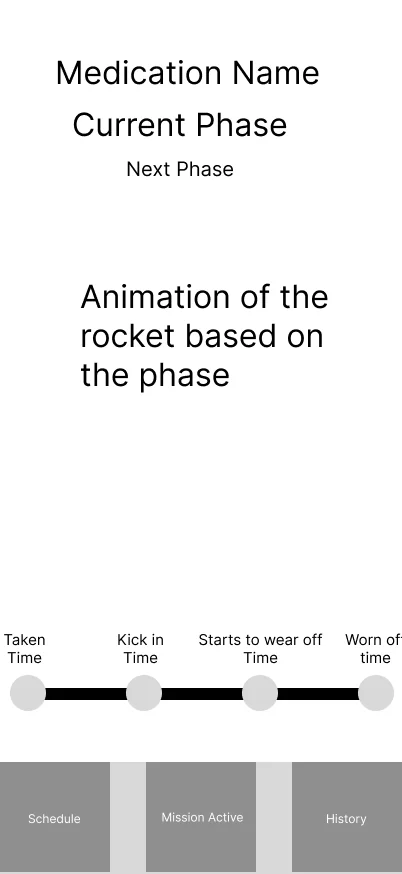
Creating some crude mockups in Figma to get ideas into something tangible and clickable. Doesn't take much time, but when creating them doubt creeps in about the circular dial and how I'm gonna map the phases on it. I remember that Apple's Activity app already does something like that and uses arcs extensively, so it's doable.
Week 2: Writing specification and logic
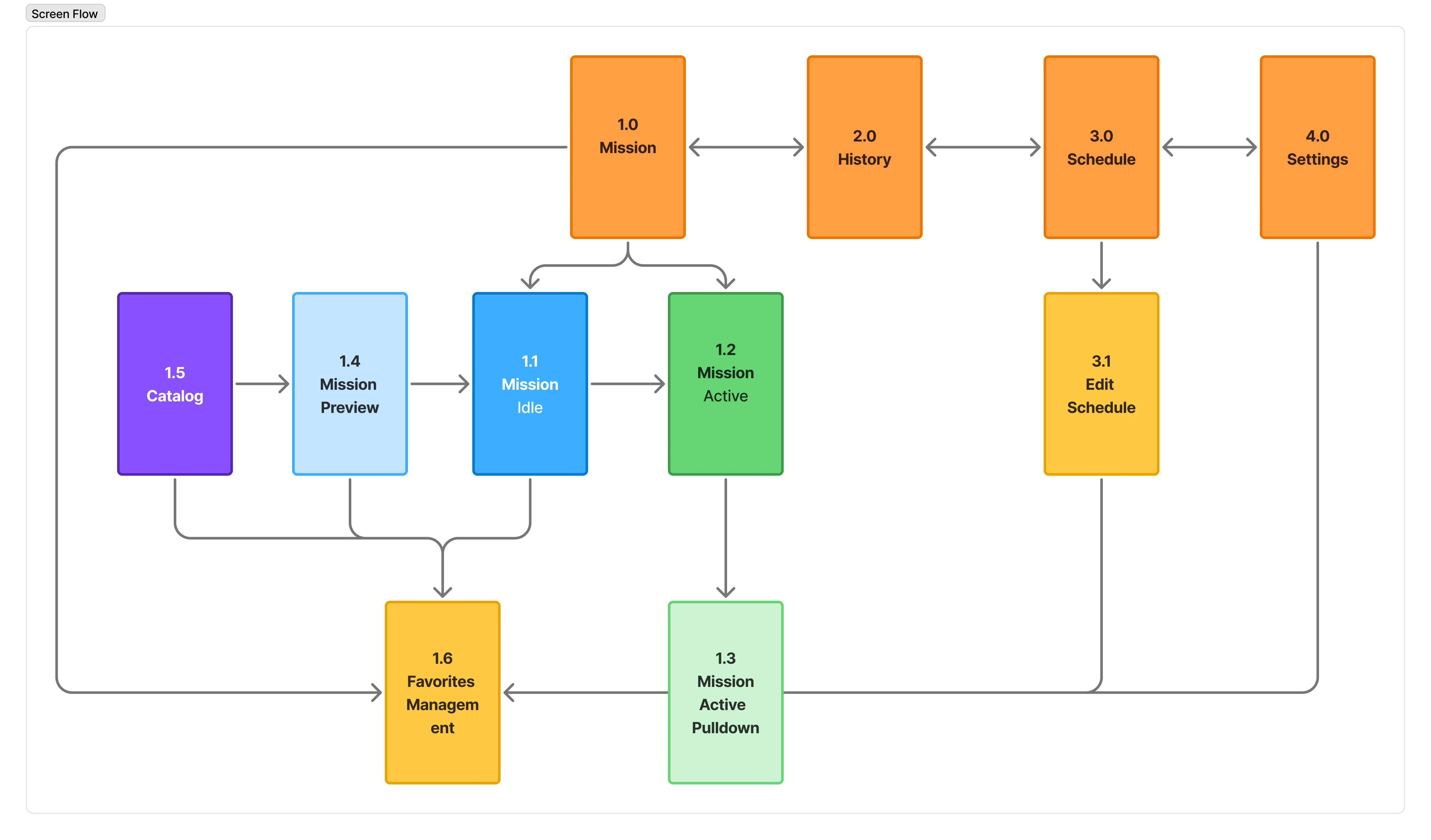
Time to move on to the logic of the app and user flow. I map things on a whiteboard and create initial diagrams in Figma. The flow seems straightforward and I continue with the taxonomy of things and create a simple spreadsheet to track the progress of the development (which will be promptly dropped in just a few weeks).
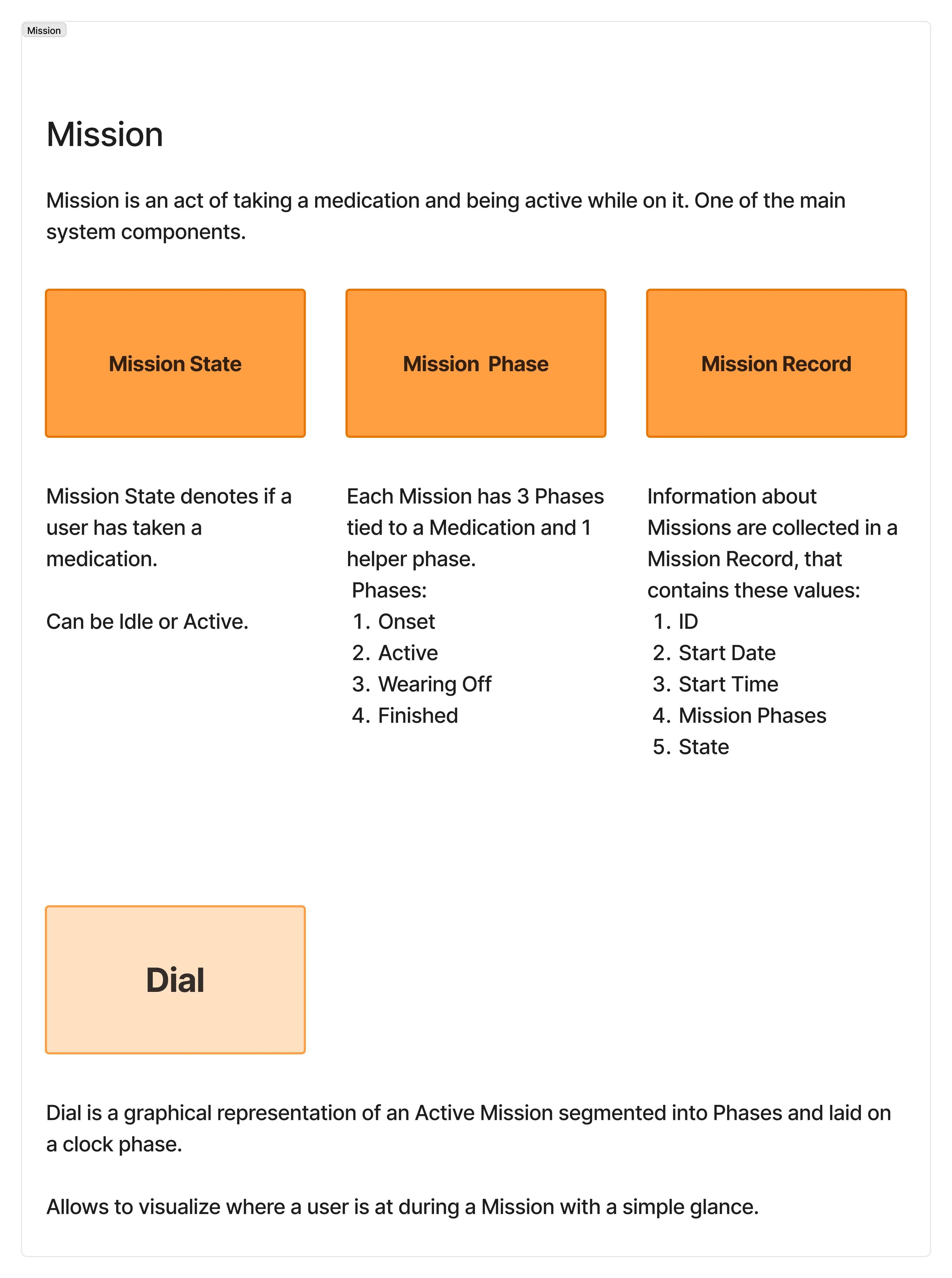
My main problem is figuring out how to work with arcs and be able to map things on the dial. I create a simple HTML/CSS/JS/SVG mockup to see if I can control all the pieces of the puzzle.
The idea is you feed the component the duration of each med phase and it maps them onto the dial automatically. Everything is SVG so it renders cleanly at any size, React hooks for state management.
First lesson in how much more complex things are. Just for the dial component I needed to implement: Arc calculation, rounded segment ends (so they look nice when overlapping), segment gradients, curved text on the path, dynamic stacking of the elements, animated time hand, countdown timer, next phase logic for state switching and color manipulation. Ok that's all doable.
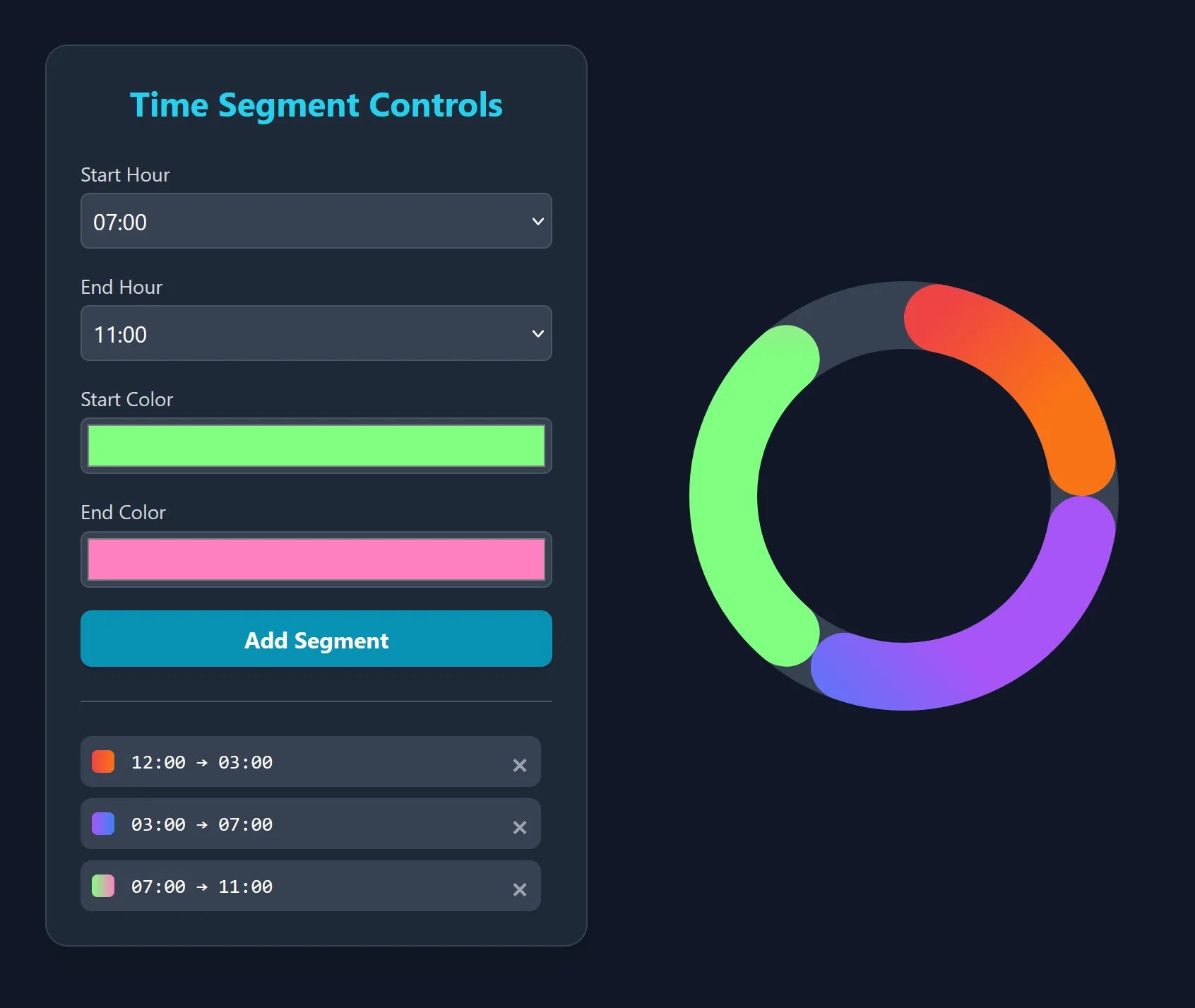
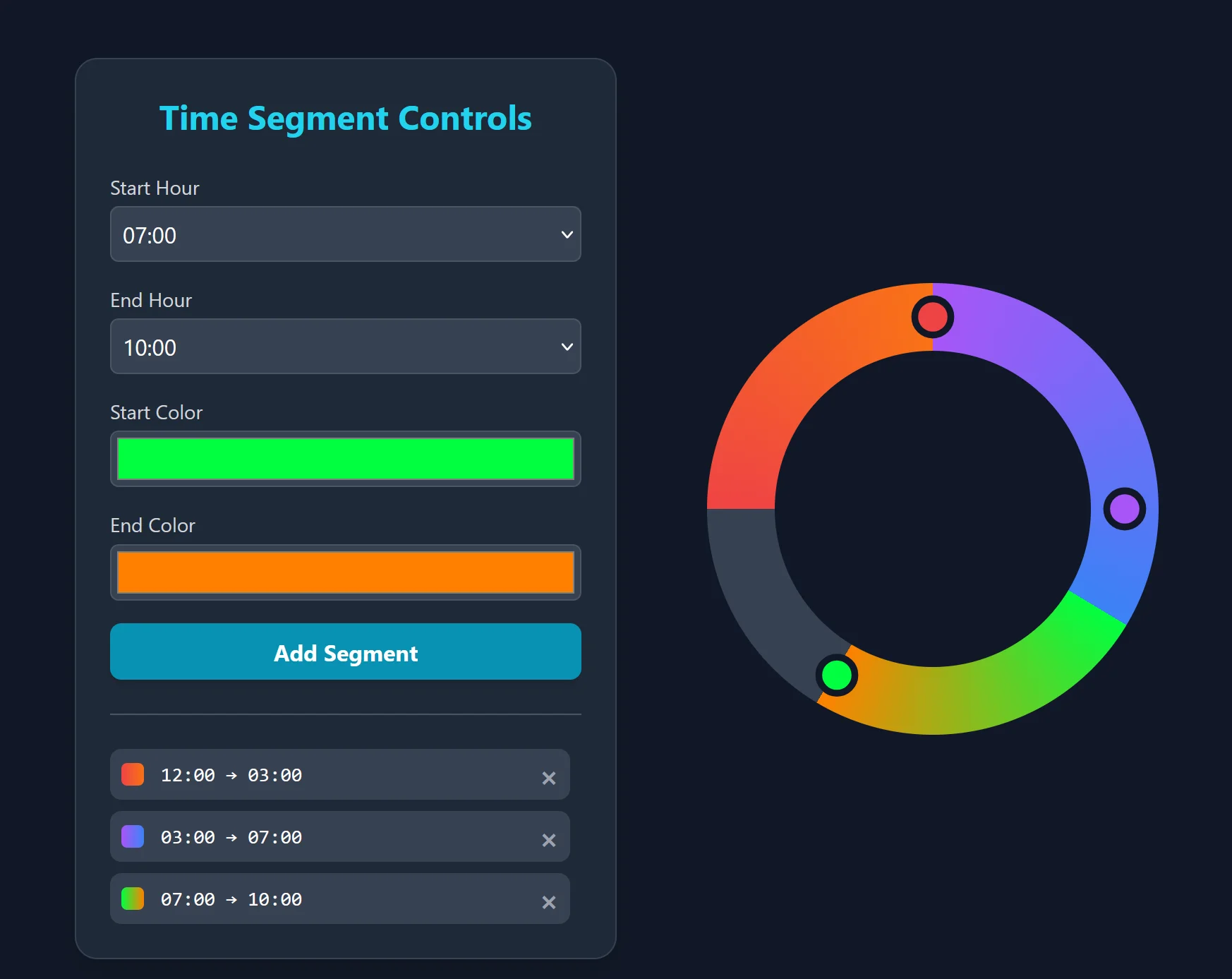
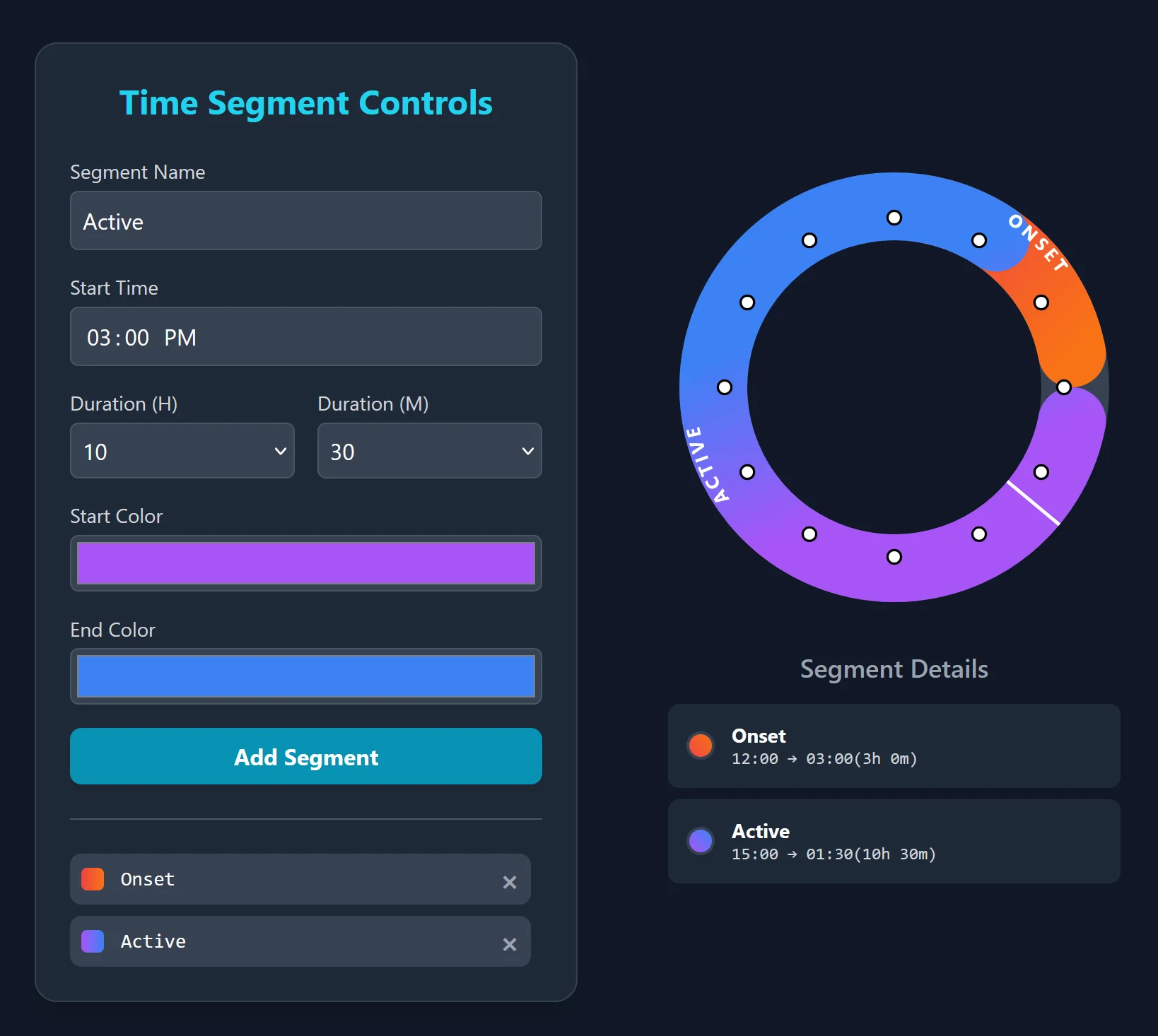
I'm getting somewhat promising results and in about two days the dial is done.
Feeling pumped, main challenge for now is technically solved.
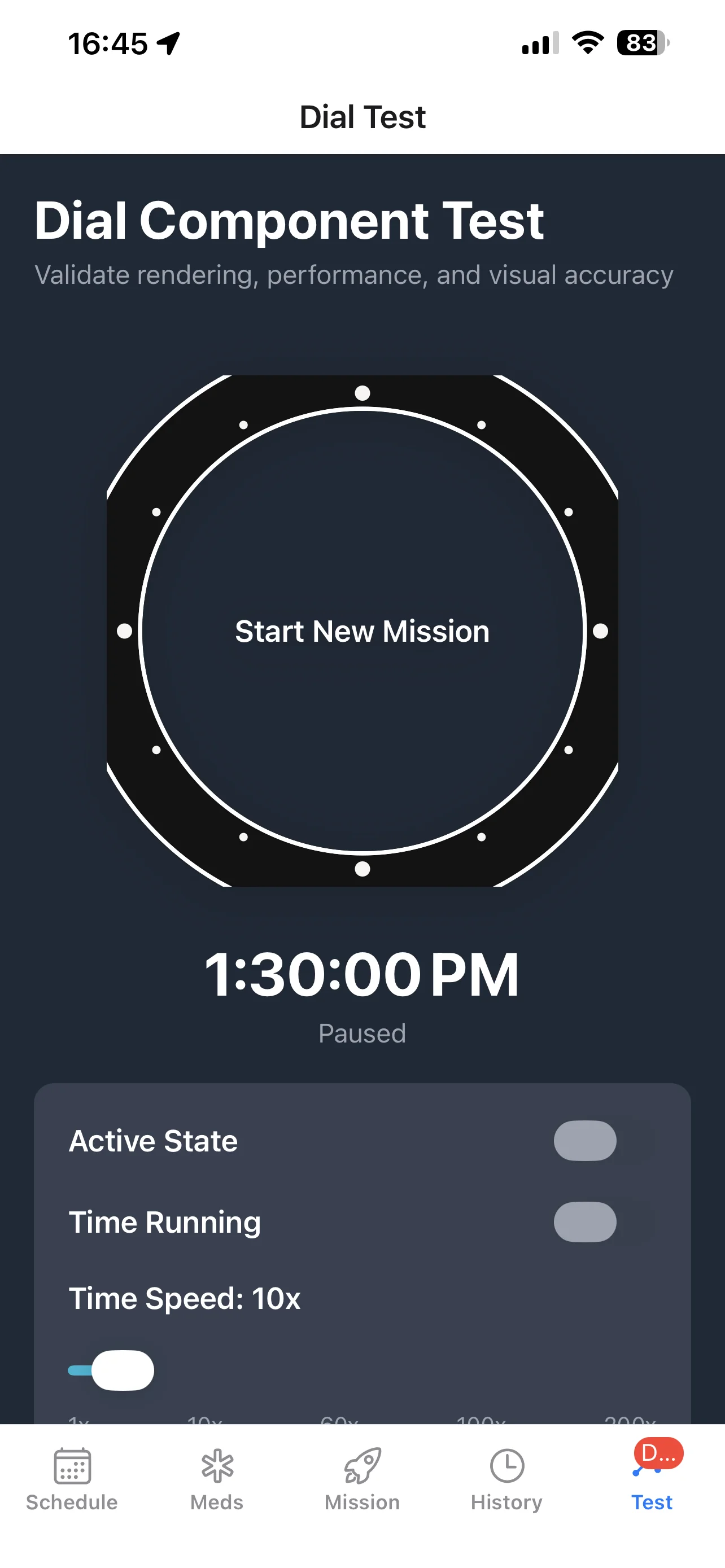
Meanwhile also working on research into pharmacokinetics and finding good data for major medications. Learning that medical research is heavily paywalled.

November
Weeks 3-4: Design
Ok it's time to actually make things look pretty. I decide to settle on bright invigorating colors. Each dominant color is associated with a meds phase, and matching gradients for transitions between them.

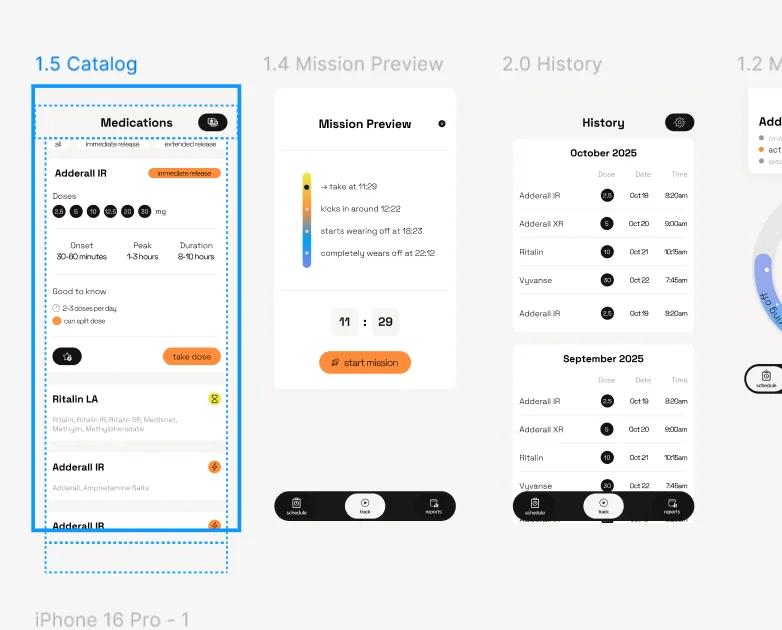
Spend about a week building the main screens and the dial component in Figma. Everything is such a mess I wish I started with a design system. I figure the project is not gonna take more than 5-6 weeks, so I can scrap the design system for now and just add components as I go.
Create a first version of the dial design and here is my first technical hurdle, how do I convert my Figma components into React ones? Learn that React components are not CSS/HTML, but their own flavor of the same philosophy. Why does every native platform need to reinvent layout when CSS already figured this out years ago with flexbox, grid, and everything else?
Dive deeper into Figma dev mode, but that thing sucks for React, especially with my poorly organized Figma components to begin with. Try a few AI Figma plugins that promise to convert designs to code, they're all subpar. Learn enough React to understand how to style the components, Claude ends up being the best option for converting Figma components into React ones, but some tinkering is still necessary.

Update my phone to iOS 26 and realize that the new glass UI is not supported in current version of React Native, I guess it will have to wait for now.
Continue working on matching the screens of the app and wiring up business logic and user flows. Extensive testing of the dial component, have to figure out how to speed up time so I can test UI changes and make sure nothing breaks.
I also need 3 separate builds: production (trial + monetization engine), preview (no trial limits), and dev (full suite of dev toggles, screens and functionality to test the app). I'm thinking I'll have to maintain separate codebases for each, which sounds like a nightmare. Then I discover feature flags and realize I can just have one codebase and toggle features on and off per build. One of those moments where you feel dumb for not knowing something so obvious, but also relieved you found it before going down the wrong path.
Week 5: It works
Exciting! Have a working prototype on my phone with all the basic features ready to go! Mission tracking, Schedules, History, Metabolic Profiles, Settings, Meds Catalog and Favorites are all done!
Start using Get Zesty! every day and ironing bugs. Take a few days to relax a bit, been working 8-12 hours daily at this point and feel like I'm burning out. Instead of going to the gym 4-5 times, can barely get there 2-3 times per week, my strength and power are going down.
Implement trial mode by saving data to keychain so it persists across reinstalls, meaning users can't game the trial by deleting and redownloading. 7 free missions every month if they just occasionally take their meds.

The thing that broke me: Live Activities
So far I've been using my remote Linux machine for coding and just using my Windows laptop to SSH into it. With Expo I can create a dev build of my app and have it update live on my phone, and so far the experience been great!
The only problem is, I can't use React Native/Expo to create Live Activities! (in the most recent update they added the feature, if only I waited a few months).
Start researching how I can make it work, as without Live Activities, the main feature I wanted to build won't work. Apple has zero documentation on the matter, just a few blog posts detail how to build a bridge between React app and a native wrapper for the Live Activities. You need a Mac for that.
Get a used M4 Mac Mini, set up the environment and move everything from remote Linux machine to this Mac.
macOS feels like molasses, I don't know the shortcuts, my niche weird apps I've been using on Windows for decades are not available on macOS. There are substitutes, but it takes time to learn.
I can go into a long rant on how broken macOS feels, but I just accept my productivity will tank while I figure things out and try to make the transition as fast as possible.
Since I work from different cafes and outdoors, I need to be able to access the Mac Mini remotely. I try all the paid remote desktop solutions and they're way too slow. End up deploying my own RustDesk instance on my server, which turns out to be the best option. Plus I'm paranoid about giving some company's remote access software full control of both my computers.
On top of that, my iPhone 13 doesn't support Live Activities. So I buy a new iPhone too. Testing on a simulator wasn't gonna cut it, I wanted to see them on a real device and I've been dogfooding the app every day to spot bugs as they happen.
As I've never written a line of Objective-C, I just copy the bridge shared in a blog post and hope it works.
Don't get me started on destinations and build configurations.
I realize that my emotional regulation is hanging by a thread. I was cheerful and ready to go in the morning when working on mockups, design, business logic, even developing using VS Code and React Native. But Xcode and all the Apple's bs is just killing me. I dread opening my computer in the morning.
Week 6: Xcode
Xcode is ... abomination. My hatred for macOS intensifies with vigor.
Either 16GB is not enough for my workload, or it just plainly sucks.
Just creating and previewing Live Activities in Xcode takes at least 3 minutes to render! It's faster to just build the entire application to preview! And building to device doesn't hot reload like React Native, every change needs a full recompile.
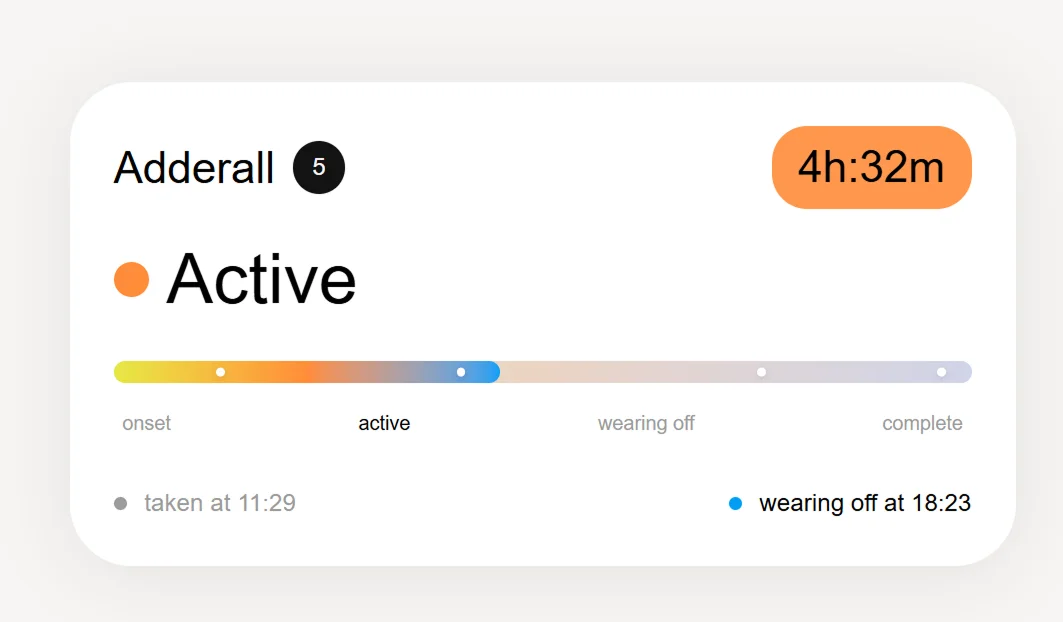
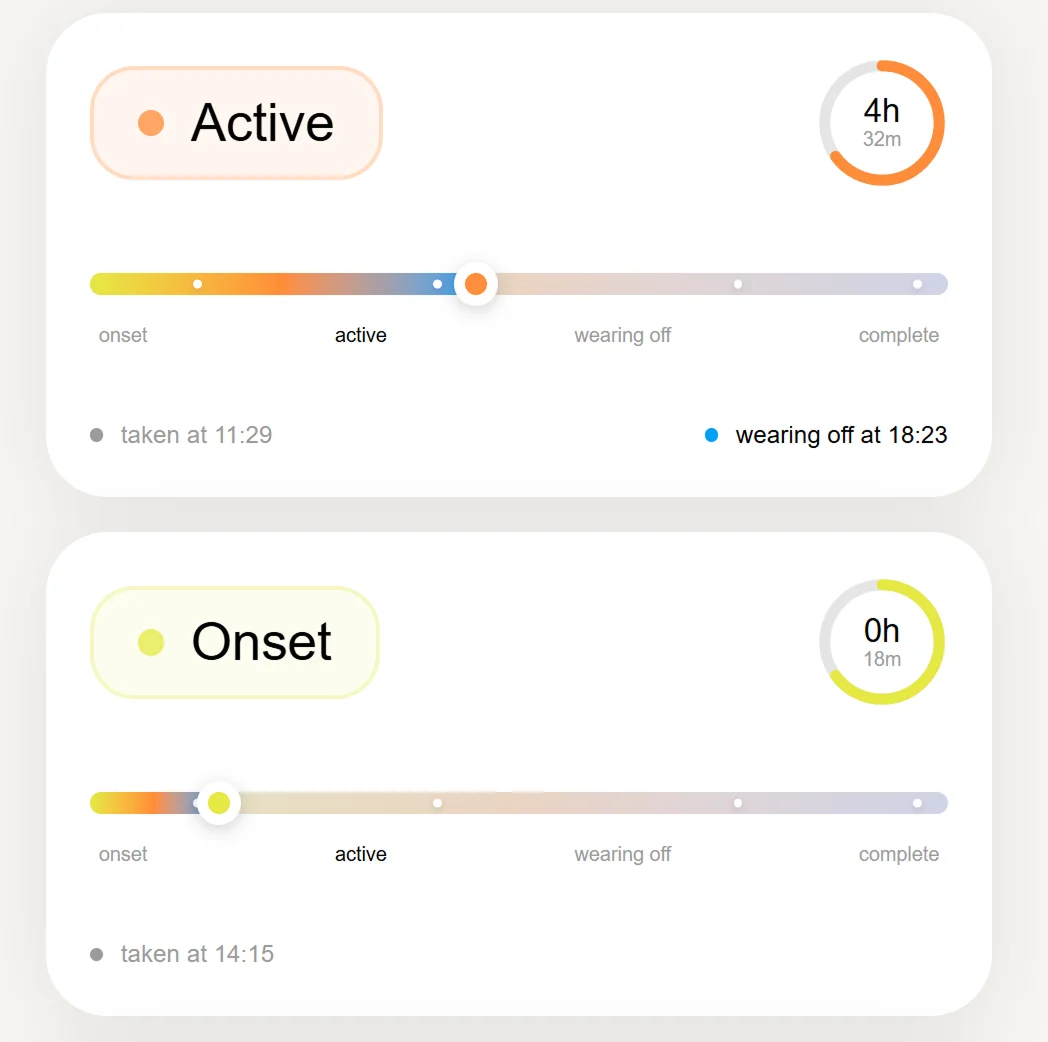
Now I have to learn SwiftUI, which uses something completely different with stupid H and V stacks for layouts!
Can we adopt a STANDARD for layout please?
Build environments
Let's just say I understand now why companies pay millions for dedicated build environments.
So far I've been using Expo for my builds, but now since I have Mac and need to compile new builds all the time, I want to try building locally in Xcode.
Xcode keeps resetting objectVersion higher than my 50, which breaks the build. And it just doesn't work. The same project just doesn't build on my machine. Surprised pikachu face.
This is the part that nearly broke me after Live Activities. One day everything compiles fine, next day out of nowhere nothing builds and you have no idea what changed. Xcode likes to silently update things on its own, certificates are a nightmare to manage, I've reinstalled CocoaPods maybe 50 times at this point, and derived data corrupts constantly. You fix one thing, something else breaks. Build errors multiply like Kuribohs.
Learn about eas.json vs app.config.js, about the environments and finally get it working.
eas build --local now works
But I have completely run out of 256GB space in just 10 days, cleaning build folder and artifacts doesn't really help.

December
Week 7: The SSD saga
The app should have already been submitted to the App Store in my initial estimate. We are nowhere near done.
Research if I can upgrade Mac Mini's storage, and hallelujah you can!
Read a couple of tutorials online, everything seems trivial, I just built a new PC a few months ago, so this is a piece of cake.
Replacing the SSD takes less than 20 minutes.
But wait, what's that? You need another Mac to restore the system.
Excuse me, but WTF? Who has another Mac laying around? Why can't I use an iPad or an iPhone for this?
It's 3AM and I'm determined to get this done.
I spin up a macOS virtual machine on my desktop Windows PC (which took a while by itself). Thinking I have defeated Apple, I passthrough the USB from the Mac Mini to the VM expecting it to complete the restore process. Oh what a sweet summer child I was.
The VM sees the Mac and can even communicate with it, but whenever it needs to complete the restore, Windows plays the USB eject sound and nothing happens.
I try all 8 USB ports on the PC, nothing works, people describe the same problem on Reddit.
Fuck it, I order a MacBook Air on Amazon and go to bed at 5AM.
It takes 5 minutes to complete the reset process with the MacBook Air. Returned the same day.
Week 8: Freefall
Haven't been to the gym all week and the mood is deteriorating fast.
While building locally my Mac lost power mid-build. I try building again what was working just minutes before and get errors I haven't seen before.
I try everything other than resetting macOS. Three days. Nobody online has ever mentioned this issue. On third day I finally stumble upon the culprit while looking for something completely unrelated -- a certificate from the previous EAS build got stuck in the keychain. EAS would download a new certificate, but since it had a previous one already, it just couldn't build.
Finally get the Live Activities working properly, but there are so many bugs with them. Technical debt pile just keeps growing.
At this point I have descended into a depressive episode and can't even leave the house.
Weeks 9-13: Winter
Depressive episode in full swing. Holidays come and go, there is zero joy in the world.

January
Week 14: Coming back
Mid of January things are finally starting to shift.
In a week I fix all the bugs with Live Activities and throw a simple website on zesty.so.
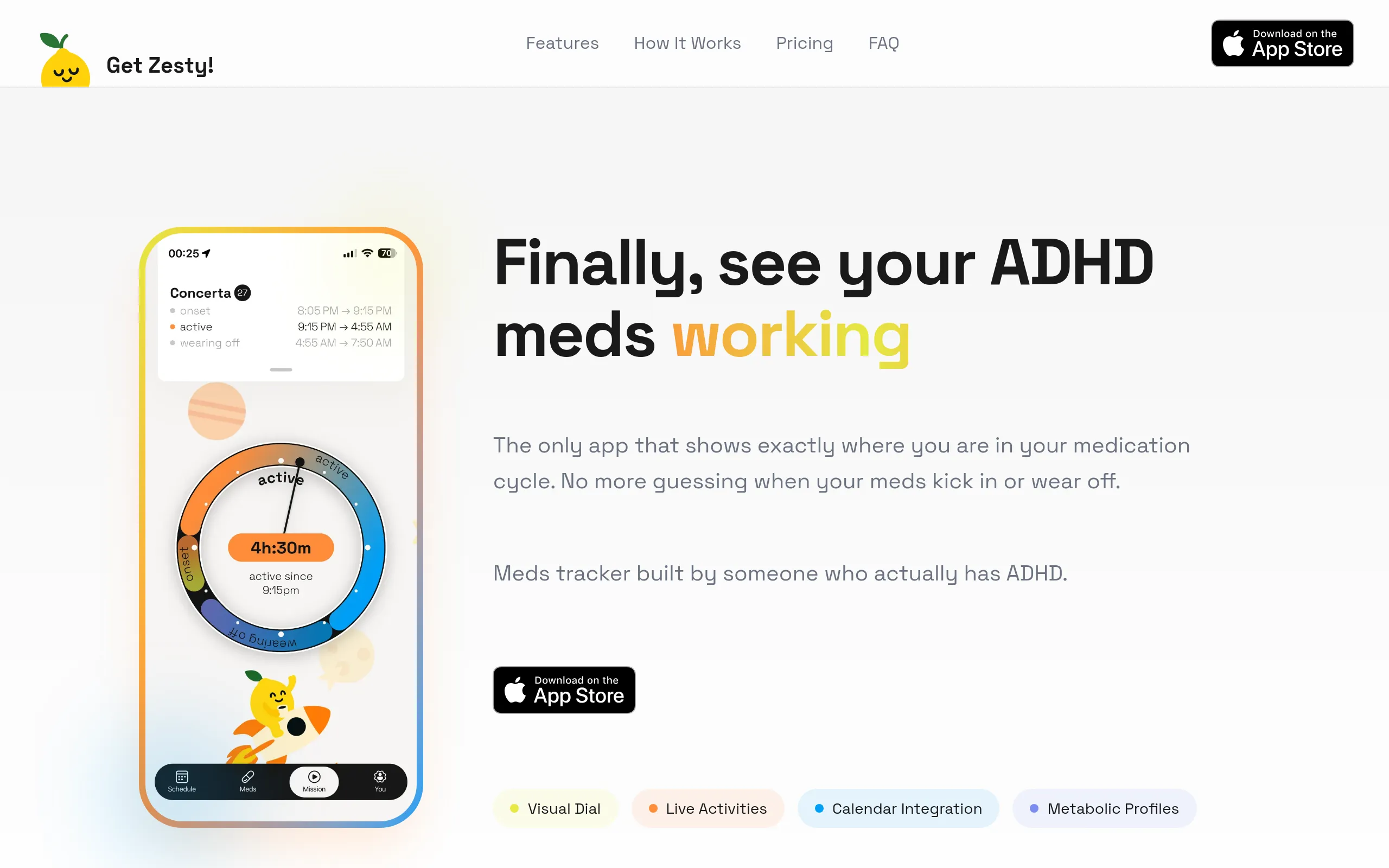
Set up the app in App Store Connect.
I really wanted to have a calendar integration, so you don't even need to open the app or be tethered to your phone so you can plan your day easier.
Knowing that I have to interact with iOS services, I have a feeling it won't be easy. It's not.
To test calendar permissions flow I have to reinstall the app all the time, at least I don't have to recompile the app just to test the logic.
Share the builds with a few of my friends to test with TestFlight.
Week 15: Hello Apple
Everything seems to be ready, bugs ironed out, app looks and behaves the way I intended, I get good feedback from my test group.
I knew Apple's review process is not the most straightforward one, but I think maybe 2 weeks tops to get it published. Right.

February
Weeks 16-18: Review Purgatory
Back and forth with Apple over labels on buttons and how my upgrade screen looks like. I have to redesign a few screens completely because they don't look good on iPad. The app was never designed for iPad, why are they testing it on iPad?
I just accept the fate and work quickly to resolve the submission errors. It takes 2-4 days to get Apple's feedback. And it's just one element that needs to get fixed.
Behold: I had a button labeled "Request Calendar Permissions". Apple rejected it. The button needs to say "Next" or "Continue". Not the functionality, not the flow, not the logic. Weeks of back and forth because Apple didn't like the word "Request" on a button.
Week 18: Published

Get Zesty! is approved and finally on the App Store!
I thought I'd feel elated. I'd been thinking about this moment for a while. What I actually felt was relief, just relief. There was a tinge of happiness, but mostly I was just glad it was over.
What I've learnt
1. There is no substitute for experience -- Claude Code is powerful, it got me through problems I couldn't have solved on my own. But every time I hit something that required understanding how Apple's ecosystem actually works, how certificates interact with keychains, how Xcode manages build environments, no amount of AI could replace just knowing.
2. AI-assisted development for production grade apps is a completely different animal from testing ideas and small mockups. Building a prototype with AI is fast and genuinely impressive. Shipping a real app that handles edge cases, passes App Store review, and works across devices is a completely different challenge. At least for me at this moment.
3. There will be unknown unknowns. I budgeted 5-6 weeks. It took 5 months. Not because I was slow, but because I couldn't have predicted needing a second Mac to restore the first one, or that a stuck certificate would cost me three days, or that Apple would reject my app over a button label. Or that my iPhone 13 wouldn't even support Live Activities. Or that I would completely burn out.
4. I hate Apple.
5. Be more mindful about my own stamina and emotional state. I pushed through 12-hour days for weeks, ignored the gym dropping off, ignored the mood deteriorating, and ended up in a depressive episode that cost me over a month. The project would have taken longer with breaks, but it also wouldn't have broken me.
6. Paying for dev/build environments makes sense. I thought I was saving money building locally. I filled 256GB in 10 days, bought an SSD upgrade, bought a MacBook Air just to restore the Mac Mini (returned it the same day), and lost three days to a certificate stuck in a keychain. A cloud build environment would have been cheaper than any of that. Expo charges $20-60 a month for cloud builds. Would have saved me a few weeks.
Total damage
| Item | Cost |
|---|---|
| Mac Mini M4 (used) | $449.99 |
| iPhone 17 Pro Max (after trade-in) | $900 |
| SSD upgrade | $265 |
| Apple Developer membership | $99/year |
| Claude Code | $100/month x 5 = $500 |
| Figma | $20/month x 5 = $100 |
| MacBook Air | $0 (returned same day) |
Grand total: ~$2,314. Could've saved $120 on Claude and Figma if I cancelled them during the month I wasn't using either.
---
It took a few more weeks after shipping to actually start going back to my routine. I absolutely enjoy using my own app every day and yes, if I started all over again, I would've made different choices.